%20--%3e%3csvg%20version='1.1'%20id='Layer_1'%20xmlns='http://www.w3.org/2000/svg'%20xmlns:xlink='http://www.w3.org/1999/xlink'%20x='0px'%20y='0px'%20viewBox='0%200%20530.1%2097.1'%20style='enable-background:new%200%200%20530.1%2097.1;'%20xml:space='preserve'%3e%3cstyle%20type='text/css'%3e%20.st0{fill:%23282725;}%20.st1{fill:%23FF471C;}%20%3c/style%3e%3cg%3e%3cpath%20class='st0'%20d='M514,15.9c0,3.5-2.8,6.2-6.1,6.2c-3.4,0-6.1-2.8-6.1-6.2c0-3.4,2.8-6.1,6.1-6.1C511.2,9.7,514,12.5,514,15.9z%20M513.3,15.9c0-2.9-2.4-5.3-5.4-5.3c-3,0-5.4,2.4-5.4,5.3c0,3,2.4,5.4,5.4,5.4C510.9,21.3,513.3,18.9,513.3,15.9z%20M509.2,16.3%20l1.4,3.4h-0.8l-1.2-3.2h-2v2.8c0,0.3-0.1,0.4-0.4,0.4c-0.2,0-0.3-0.1-0.3-0.4v-6.9c0-0.3,0.1-0.4,0.3-0.4h2.2c1.2,0,2.2,1,2.2,2.1%20C510.6,15.2,510,15.9,509.2,16.3z%20M509.8,14.3c0-0.8-0.6-1.4-1.4-1.4h-1.9v2.8h1.9C509.2,15.7,509.8,15.1,509.8,14.3z'/%3e%3c/g%3e%3crect%20x='283.5'%20y='10.4'%20class='st0'%20width='3.8'%20height='44.2'/%3e%3cpolygon%20class='st0'%20points='248.9,31%20219.2,31%20219.2,10.4%20215.4,10.4%20215.4,54.5%20219.2,54.5%20219.2,34.8%20248.9,34.8%20248.9,54.5%20252.7,54.5%20252.7,10.4%20248.9,10.4%20'/%3e%3cpolygon%20class='st0'%20points='354.8,50.8%20354.5,50.8%20324.8,10.4%20318.7,10.4%20318.7,54.5%20322.5,54.5%20322.5,14.2%20322.9,14.2%20352.5,54.5%20358.6,54.5%20358.6,10.4%20354.8,10.4%20'/%3e%3crect%20x='388.9'%20y='10.4'%20class='st0'%20width='34.3'%20height='3.8'/%3e%3cpath%20class='st0'%20d='M392.7,37.7c0-1.6,1.3-2.9,2.9-2.9h21V31h-21c-3.7,0-6.7,3-6.7,6.7v16.8h34.3v-3.8h-30.5L392.7,37.7L392.7,37.7%20z'/%3e%3cpath%20class='st0'%20d='M33.5,33.7c-0.1,0.1-0.2,0.1-0.3,0.1s-0.2,0-0.3-0.1L16,10.4H9.9v44.1h3.8V14.2h0.4L29.8,36%20c0.8,1.1,2,1.7,3.4,1.7c1.3,0,2.6-0.6,3.4-1.7l15.7-21.7h0.4v40.3h3.8V10.4h-6.1L33.5,33.7z'/%3e%3cpath%20class='st0'%20d='M185.7,41.7c-3.4,6.3-10,10.2-17.2,10.2c-10.8,0-19.5-8.7-19.5-19.4s8.8-19.4,19.5-19.4%20c7.2,0,13.7,3.9,17.2,10.2l0.2,0.3l3.3-1.8l-0.2-0.4c-4.1-7.5-11.9-12.1-20.5-12.1c-12.9,0-23.3,10.4-23.3,23.2s10.5,23.2,23.3,23.2%20c8.6,0,16.4-4.7,20.5-12.2l0.2-0.4l-3.3-1.8L185.7,41.7z'/%3e%3cpath%20class='st0'%20d='M102.4,10.4l11.3,25.3H94.1c-2.6,0-5,1.6-6.1,4l-6.7,14.9h4.2l6-13.3c0.5-1,1.5-1.7,2.7-1.7h21.3l6.7,15h4.2%20l-19.6-44.2L102.4,10.4z'/%3e%3cpath%20class='st1'%20d='M486.7,45c2.8-3.9,4.4-8.7,4.4-13.6c0-16-16.3-28.2-33.1-21.1c-5,2.1-9,6.1-11.1,11.1%20c-7.2,16.8,5.1,33.1,21.1,33.1h26.8V45H486.7z%20M479.6,39.6l-5.4-7.3l-7.7,5.7l5.6,7.6l-4.3,0.1c-7.5,0-14-6.5-14-14%20c0-8.4,6.7-14.4,14.2-14.4c8.4,0,14.2,6.8,14.2,14.5C482.2,34.4,481.2,37.4,479.6,39.6z'/%3e%3c/svg%3e)
Gateway Selection
Choosing the right gateway (or gateways) is one of the most important decisions for a successful update. The goal is always the same: reach as many devices in the campaign as possible without overlapping radio coverage, which can cause on-air collisions. This guide covers both automatic gateway selection performed by the FUOTA server and how to select gateways manually when you need full control.
Before You Begin
You need:
- A device group and the DevEUIs you plan to update. See Quick Start Guide.
- The NodeID of any gateways you intend to specify manually. A NodeID is a unique gateway identifier printed on the back of any MachineQ gateway (for example
2CC4070000001234). $MQ_TOKENexported from the authentication step. See Quick Start Guide.
Automatic Gateway Selection
Starting with API version v3.0, the FUOTA server automatically selects gateways based on the provided set of DevEUIs. The server chooses the best combination of gateways to cover as many devices as possible without overlapping coverage. If some devices are not reachable by any customer gateway, or coverage is poor, the server still includes them in the campaign. When the campaign restarts, the server automatically updates the gateway list based on the devices that did not update.
How to Use Automatic Selection
To enable automatic gateway selection, skip providing the gateways field when creating the device group.
If you already created a campaign whose device group specifies a list of gateways, you can force automatic selection by setting the gateways property to either null or an empty list when calling the restart API.
curl -sS -X POST "https://fuota.machineq.net/api/v3.2/campaigns/restart" \
  -H "Authorization: Bearer $MQ_TOKEN" \
  -H "Content-Type: application/json" \
  -d '{
    "campaign_id": "<campaign_id>",
    "gateways": null
  }' | jq
Unless explicitly changed, the server continues to respect the original selection on every restart:
- A campaign created or restarted with a device group that has a specific list of gateways will keep using those gateways on automatic restart and on a manual restart without the
gatewaysproperty. - A campaign created or restarted with a device group that has an empty gateway list will re-run automatic gateway selection on every restart.
Note: If you manually define the list of gateways using the
gatewaysparameter, the server will not try selecting gateways, even on campaign restart.
Which devices are included in the picking process? Whenever the campaign restarts, the automatic gateway selection algorithm only looks at the failed devices. As the list of devices needing an update changes, the gateway selection might also change.
How Automatic Selection Works
The algorithm is tuned to maximize the number of devices most likely to update while avoiding gateway overlap during the multicast session, which reduces on-air collisions, repetitions, and out-of-order fragments. The process is:
- Determine the list of gateways that all participating devices reach, regardless of connectivity quality.
- Group all trivially overlapping gateways. A "trivial" overlap is when one gateway can fully cover another gateway's devices while maintaining good connectivity to all of them.
- Perform a more complex assessment of overlap by analyzing device-to-gateway connectivity quality, finding the combination of gateways with the most non-overlapping device coverage. A small overlap is allowed only if it increases the non-overlapping device count.
Overlapping vs. non-overlapping devices: An "overlapping device" reaches multiple gateways at the same time; the gateways it connects to have overlapping coverage. A "non-overlapping device" is connected to only one gateway.
Using RSSI and the number of uplinks: The server looks at both the average RSSI and the number of uplinks for each gateway to determine which is more reliable. For example, if a device reached GW1 100 times with an average RSSI of -90 and GW2 only 5 times with RSSI -70, GW1 is the better option because it reliably hears the device even though its RSSI is slightly lower.
Selection Examples
The following scenarios illustrate how the algorithm chooses gateways.
Case 1: Full Overlap
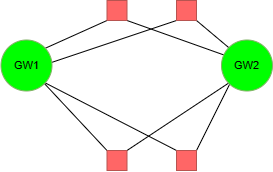
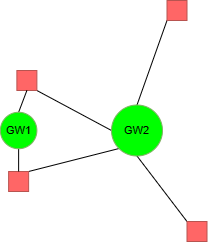
In the first scenario, all four devices have roughly the same connectivity quality for both gateways. In the second, two devices have much better connectivity to GW1 while their connectivity to GW2 is still acceptable, so picking GW2 would still cover all four devices. In both cases the server analyzes the combined connectivity of both gateways and picks the one with better connectivity to all devices combined, scored by RSSI and number of uplinks.
Picked gateways: GW1/GW2 (based on the combined connectivity score).
Case 2: Overlapping and Non-Overlapping Coverage
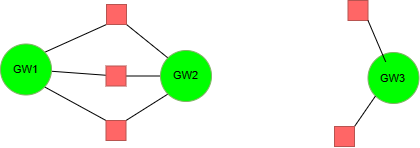
Some gateways have simple overlapping coverage while others have none. The server picks between GW1 and GW2 based on the combined connectivity quality for the three shared devices, then also includes GW3 because it has no overlap.
Picked gateways: GW1/GW2 (based on the combined connectivity score) and GW3.
Case 3: Small Overlap
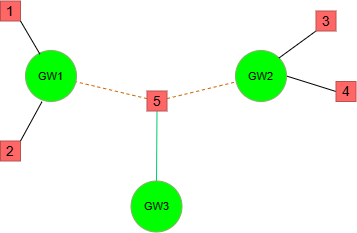
GW1 and GW2 each have two devices that do not overlap with other gateways. Device #5 overlaps between all three gateways and has better connectivity to GW3. The server selects GW1 and GW2 because that results in four non-overlapping devices; Device #5 may or may not update, but the other four update fine.
Picked gateways: GW1 and GW2.
Case 4: One Device, Many Gateways
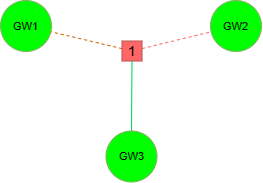
With many gateways and one device, GW3 has better connectivity than GW1 or GW2, so the server picks GW3.
Picked gateways: GW3.
Case 5: Complex Overlap 1
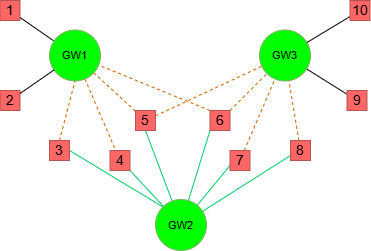
A more complex scenario with more overlapping devices. Although GW2 has the best connectivity to devices 3 through 8, choosing GW2 alone would guarantee that four other devices are never updated. To maximize the number of devices updated in a single campaign, the server selects GW1 and GW2, giving four non-overlapping devices and up to four overlapping devices a chance to update. Two overlapping gateways have, in practice, led to a reasonable success rate.
Picked gateways: GW1 and GW2.
Case 6: Complex Overlap 2
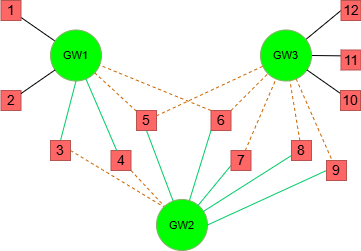
Similar to the previous case, but GW3 now has three non-overlapping devices and one additional overlapping device, while GW1 keeps better connectivity to devices 3 and 4. Picking GW1 and GW3 covers every device — ten non-overlapping and two overlapping.
Picked gateways: GW1 and GW3.
Case 7: Chained Overlap
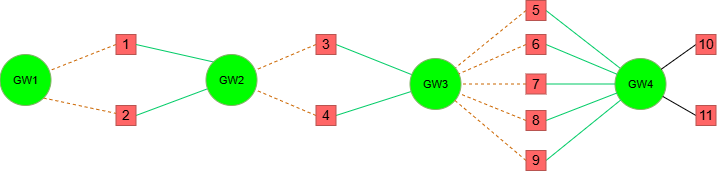
Multiple gateways form a chain of overlap. The server first resolves the simple overlaps, selecting the gateway with better connectivity for each shared pair of devices, then discards redundant gateways to avoid overlap. This can leave, for example, only GW2 and GW4 selected with no overlapping devices.
Picked gateways: GW2 and GW4.
Case 8: High Overlap Count
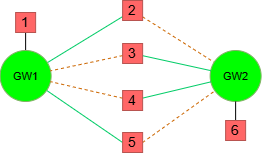
GW1 and GW2 have four overlapping devices and one non-overlapping device each. Selecting both would yield only two non-overlapping devices and four overlapping. Because overlapping devices have a lower chance of success, the server maximizes the non-overlapping count and picks only one gateway based on the combined connectivity quality, resulting in five non-overlapping devices.
Picked gateways: GW1/GW2 (based on the combined connectivity score).
Manual Gateway Selection
When selecting a gateway manually, choose one within reach of all the devices. If a device is within reach of two or more gateways at the same time, select the gateway with better coverage for all or most devices. For example, if you have a group of devices at your house, choose the gateway located at your house. If you are updating all the devices at a commercial location such as a store, use the gateway located at the store.
You can run the FUOTA update in multiple locations using multiple gateways. For example, update your home devices with your home gateway and warehouse devices with the warehouse gateway. However, if two gateways are near each other, they could cause an on-air collision because they advertise the update simultaneously.
Warning: Gateways must not overlap in radio coverage. If two gateways within a device group overlap, the resulting radio interference can increase the failure rate of updates. The Network Server applies a short delay (1 second) between each gateway, but this does not guarantee there will be no on-air collision.
Using Multiple Gateways Within the Device Group
The device group can have between two and ten (2 to 10) gateway NodeIDs. During the fragmentation session, each NodeID sends the same FragmentedData packet with roughly a 1-second delay.
Geographically Separated Gateways
If gateways' radio spectrum does not overlap, they can be considered geographically separated. Separating gateways allows running a single campaign for multiple sites simultaneously with no need to change the campaign setup.
Gateways at the Same Location
Because the FUOTA server is unaware of the gateways' geographical location, we recommend increasing the inter-fragment delay. The create campaign API accepts a frag_send_delay parameter. If you have two or more gateways in the device group, set frag_send_delay to 1.5 * {gateway count}. For example, with two gateways the frag_send_delay would be 3 seconds.
Note: Increasing
frag_send_delaymay decrease battery life. A longer delay means a longer fragmentation session, which keeps the device in class C mode longer. For battery-powered devices, this reduces battery life. Reducingfrag_send_delaybelow1.5is not recommended.
What's Next?
- Choosing Multicast Setup Time: Pick the right session setup time for your devices.
- Multicast Session Overlap Avoidance: Understand how the server prevents overlapping sessions on the same gateway.
- Upgrade Delegation: Let another subscriber manage upgrades on your devices and gateways.